
Hotkeys and Settings
The default hotkeys and how to rebind them and the MacBook Fn note and the appearance and sounds and notifications and the menu bar item.
Three hotkeys start and stop everything Clicker does and Esc stops all of it. The Settings window holds the hotkeys and the appearance and the sounds and the notifications. Open it with Clicker and then Settings or Command comma on macOS and File and then Settings on Windows. Every change applies at once.
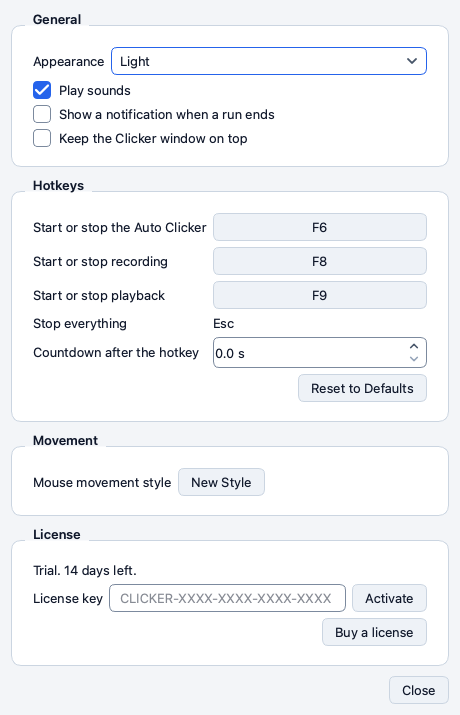
The default hotkeys
| Action | Default | What it does |
|---|---|---|
| Start or stop the Auto Clicker | F6 | Starts a run or stops the one that is on |
| Start or stop recording | F8 | Starts a recording or stops it |
| Start or stop playback | F9 | Starts a playback or stops it |
| Stop everything | Esc | Stops every run and recording and playback and selection. This one is fixed |
The Run menu and the Start and Record and Play buttons show the current binding so you always see which key does what.
Where the hotkeys work
On macOS the three hotkeys work in every app once Input Monitoring is on. You can start a run while a game or a browser is in front. Without Input Monitoring the hotkeys work while Clicker is in front.
On Windows the hotkeys work while a Clicker window is focused.
A hotkey still fires in other apps. A hotkey that another app also uses triggers both. Pick a key that nothing else on your computer uses.
The MacBook Fn note
On a MacBook the function keys control the brightness and the volume by default. Hold Fn with F6 or F8 or F9. Or open System Settings and then Keyboard and switch on Use F1 F2 and so on as standard function keys and the hotkeys work without Fn.
Rebind a hotkey
- Open Settings and go to Hotkeys.
- Click the key button next to the action. A dialog reads Press the new key.
- Press the key you want. Hold any modifiers you want with it.
- Click OK.
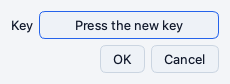
Clicker refuses a combination that another Clicker hotkey already uses and a combination that is a Clicker or system shortcut. Reset to Defaults brings back F6 and F8 and F9.
A hotkey with modifiers waits until you let go of the modifiers before the first click. A letter key shows its US layout name.
Why it matters. A game that uses F6 for something else needs another key. A hotkey with Shift or Control is harder to press by mistake.
Countdown after the hotkey
The Start button on the Auto Clicker page counts down 3 seconds by default so you can bring the other app in front. The hotkey starts at once by default because you press it while the other app is already in front. Countdown after the hotkey adds seconds to the hotkey start when you want them.
General
- Appearance. System or Light or Dark. System follows the appearance of your computer.
- Play sounds. A short sound when a run starts and ends.
- Show a notification when a run ends. A system notification with the end sentence of the run. On macOS it needs the installed Clicker app. On Windows it comes from the system tray.
- Keep the Clicker window on top. The window stays above other windows. The Window menu holds the same switch.
Movement
New Style rolls a new mouse movement personality. Each personality has its own speed and curve. Click it when you want the runs to look different from before.
The menu bar item
On macOS Clicker puts an item in the menu bar. On Windows it sits in the system tray. The icon shows whether Clicker is idle or running.
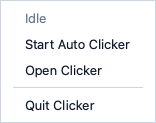
The menu holds a status line and Start Auto Clicker or Stop and Open Clicker and Quit Clicker. Stop ends a run as fast as the Stop button. The item never covers a click target.
Why it matters. With Hide Clicker while it runs on the window is gone during a run. The menu bar item is how you see that the run is on and how you stop it without the hotkey.
Window shortcuts on macOS
| Shortcut | Action |
|---|---|
| Command 1 | Show the Auto Clicker page |
| Command 2 | Show the Macro Recorder page |
| Command S | Save the profile or the macro of the current page |
| Shift Command S | Save it under a new name |
| Command Z | Undo a macro edit |
| Shift Command Z | Redo a macro edit |
| Command comma | Open Settings |
| Command W | Close the window in front |
| Command Q | Quit Clicker |
On Windows use Ctrl in place of Command. The full table is on the Keyboard shortcuts page.
License
The License group at the bottom of Settings shows the trial or the subscription and holds the key field. The License and subscription guide covers it.